
Why Your Google Ads Are Getting Clicks But No Enquiries
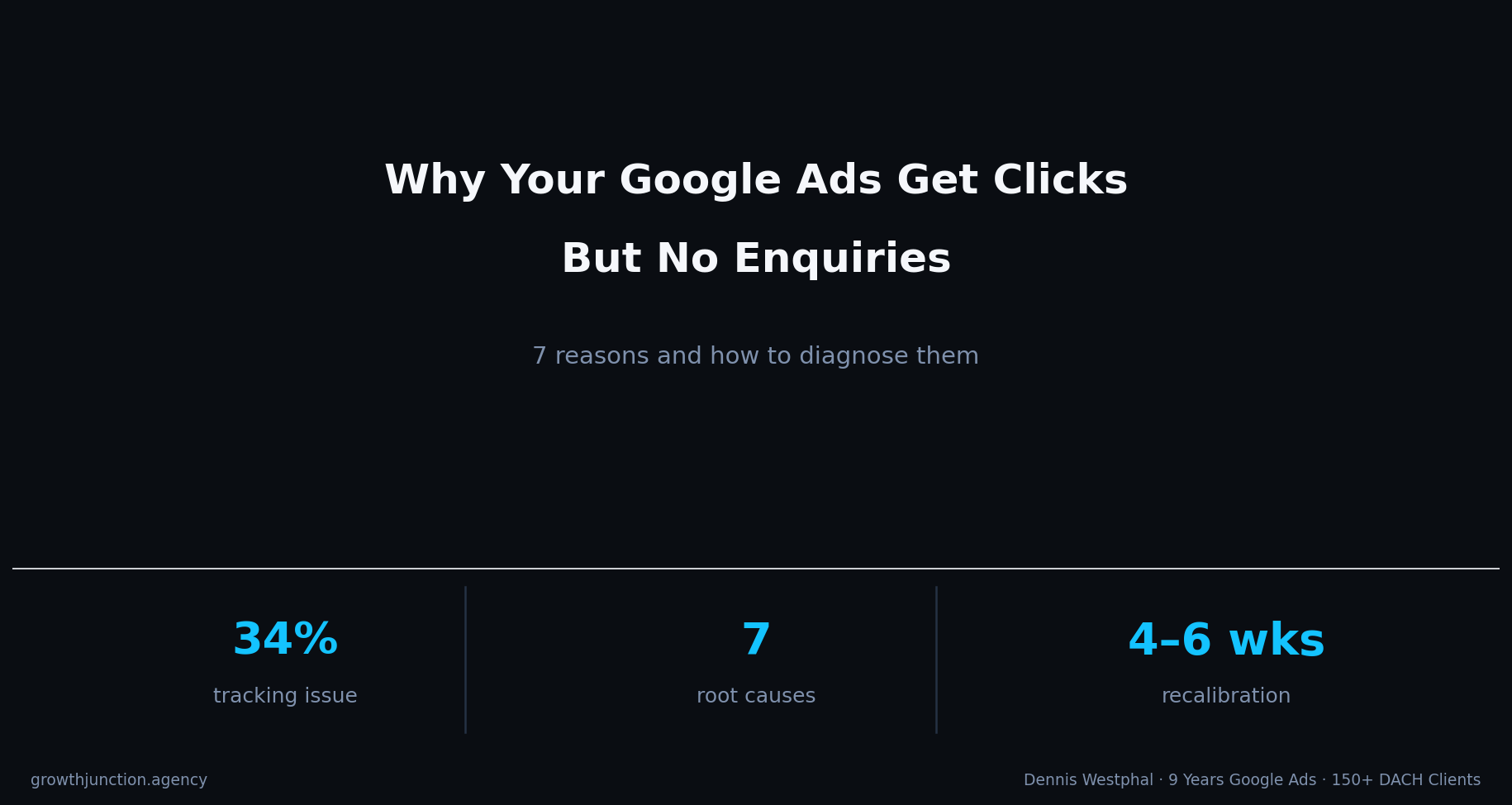
Getting clicks but zero enquiries from Google Ads is one of the most common problems in DACH accounts. In 34% of audits, the root cause is broken conversion tracking - not the campaign. Here is how to find and fix what is actually wrong.

TL;DR
- In 34% of DACH Google Ads audits, clicks with zero conversions traced back to broken or missing conversion tracking, not the campaign itself (Growth Junction audit review set, 2020-2026).
- Landing page mismatch is the second most common cause: sending cold ad traffic to a homepage almost never converts.
- The fastest diagnostic path: check tracking first, then search terms, then the landing page. Fix in that order.
Getting clicks from Google Ads but no enquiries, calls, or form submissions is one of the most frustrating situations in paid search, and one of the most misdiagnosed (Google's official conversion troubleshooter). The campaign looks alive. Impressions, clicks, and spend are all there. But nothing useful comes through. Most people assume the channel is broken or too expensive. In most cases, it is a specific problem in one of a handful of places. Based on patterns across Swiss and DACH Google Ads accounts managed between 2020 and 2026, the large majority of zero-conversion campaigns had an identifiable, correctable root cause (Growth Junction audit review set, 2020-2026). In audits, I treat this as a diagnostic sequence, not a creative problem, because the issue is usually lower in the stack than the ad itself.
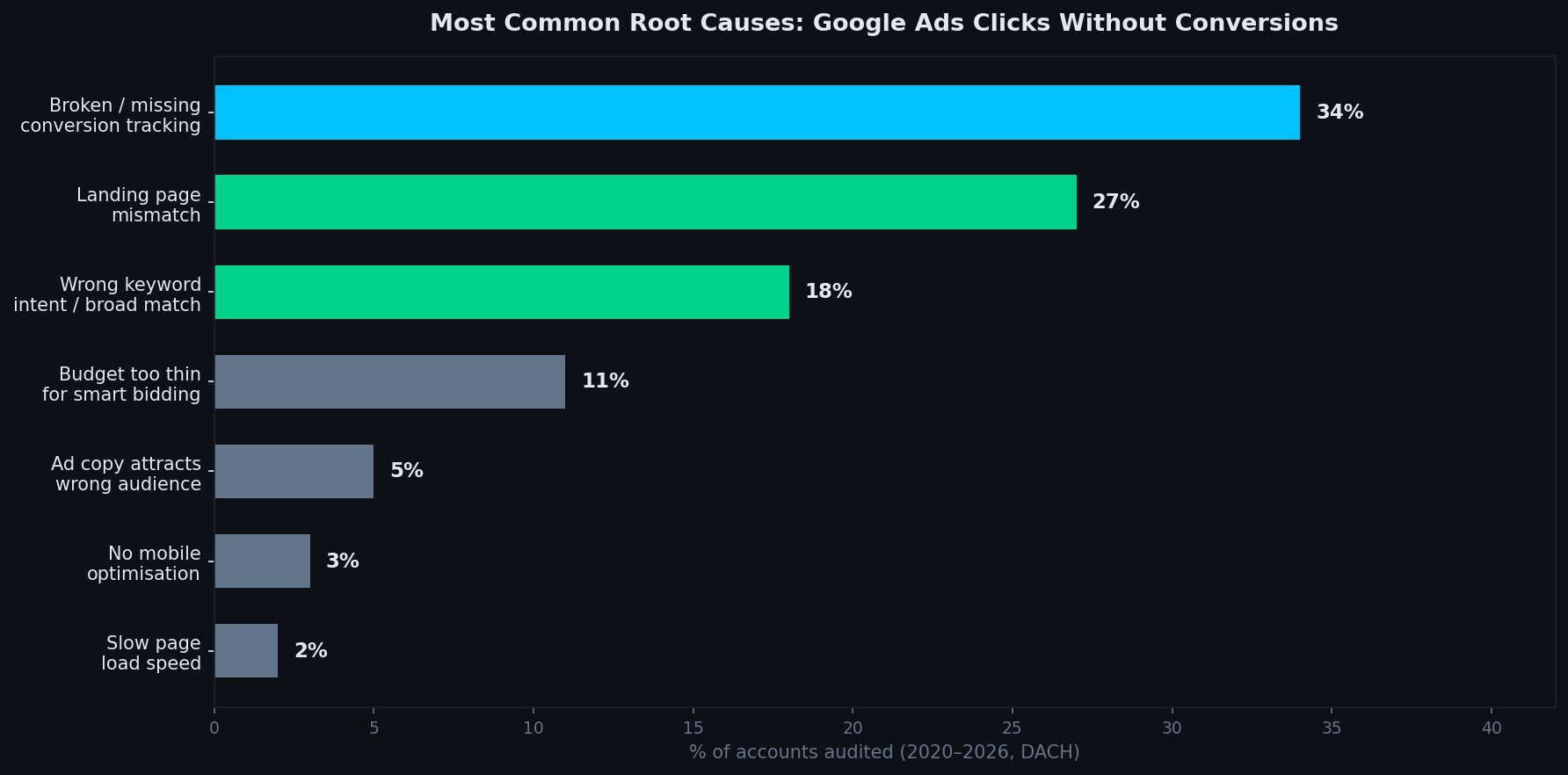
Broken conversion tracking is the single biggest cause of zero-conversion campaigns, often invisible until you actively check it (Growth Junction audit review set, 2020-2026).
Is your conversion tracking actually working?
This is always the first question to answer, because if tracking is broken, everything else you conclude from the data will be wrong. Set it up correctly first using our GA4 conversion tracking guide. You might have had conversions all along and simply not seen them. Or you might be feeding bad signals to smart bidding, teaching it to optimise for nothing. In practice, I treat every zero-conversion account as a tracking problem until proven otherwise.
Go to Tools > Conversions in your Google Ads account. Look at the status column. Any conversion action marked as "No recent conversions" or "Inactive" is a red flag. Then verify the tag itself - use Google Tag Assistant in Chrome or the GA4 DebugView to confirm the conversion tag fires correctly when someone submits a form or lands on your thank-you page.
| Symptom | Problem | Check |
|---|---|---|
| 0 conversions despite consistent clicks | Tag not firing or wrong trigger | Tag Assistant → form submit event |
| Conversion count looks too low | Only one goal tracked (e.g. missing call tracking) | Conversions tab → check all actions |
| Conversions spike then drop to zero | GTM change broke the trigger | GTM version history |
| GA4 shows sessions but no events | GA4 linked but event not created | GA4 Admin → Events list |
| Imported GA4 goal shows "inactive" | Goal deleted or renamed in GA4 | GA4 Admin → Conversions |
A common pattern: someone sets up a thank-you page redirect that later breaks due to a site update, or a developer changes a form plugin and the old GTM trigger stops matching. The campaign keeps running, keeps spending, and the conversion action shows nothing - not because nothing is happening, but because the measurement is gone.
Does your landing page match what the ad promised?
If tracking is clean and conversions are genuinely zero, the landing page is almost always next. This is also when reviewing your Quality Score becomes critical. Message match is the most underrated conversion lever in Google Ads. When someone clicks an ad that says "Same-day removals Zurich" and lands on your homepage with a generic hero image and a navigation menu, the decision to leave takes about three seconds. Most paid-traffic landing pages do not fail because they are ugly. They fail because they are non-committal.
A landing page built for paid traffic needs to do one thing: confirm that the person landed in the right place, and make one action very easy to take. That means the headline should reflect the ad's promise. The form or phone number should be above the fold on mobile. There should be at least one trust signal - a review, a specific result, a real address.
The most common landing page mistakes on Swiss SMB Google Ads accounts:
- Sending traffic to the homepage instead of a dedicated service page
- Mobile page has a contact form that requires 8+ fields
- No phone number visible on mobile without scrolling
- Page load time over 3 seconds on mobile (Swiss 4G benchmark)
- No social proof: no reviews, no client names, no specific outcomes
Are your keywords attracting people who actually want to buy?
Keyword intent mismatch is responsible for around 18% of the zero-conversion cases in DACH accounts. Broad match is usually the culprit. If you are a plumbing company bidding on "boiler" in broad match, Google can show your ads for "boiler pressure too high", "boiler error code", "industrial boiler training" - and you will pay for every click.
The fix is the search terms report, not the keywords tab. Go to Keywords > Search Terms in your Google Ads account and look at what people actually typed before clicking your ad. Sort by cost. Add anything irrelevant as a negative keyword immediately. For new campaigns with limited budgets, phrase match and exact match give you enough control to avoid this problem almost entirely.
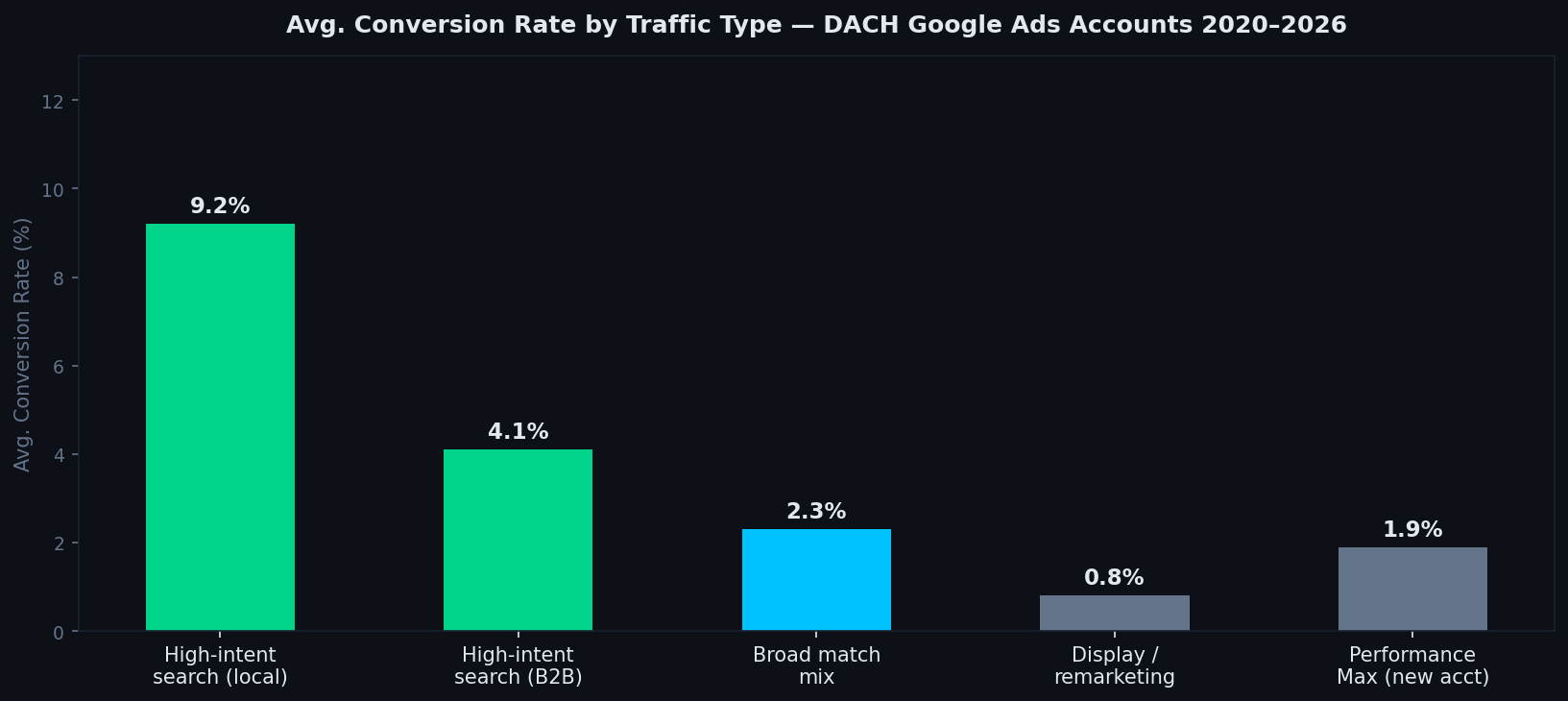
High-intent local search traffic converts at roughly 4-5x the rate of broad match mixed traffic. Intent determines economics.
Is your budget too thin for smart bidding to learn?
Google's Target CPA and Maximise Conversions strategies need data. For standard Search campaigns, around 10 conversions in 30 days is often enough for the algorithm to start learning. Performance Max and Shopping usually need closer to 30+ conversions before the signal becomes reliable. If your daily budget produces 5-10 clicks per day and conversions are infrequent, smart bidding has no signal to optimise against.
This creates a slow-burn failure mode: the campaign runs for weeks, generates a handful of conversions at unpredictable intervals, and the bidding algorithm never stabilises. Results look inconsistent because they are - the machine is guessing rather than learning.
The counter-intuitive fix is sometimes to reduce geographic targeting or keyword scope, concentrate the same budget on a smaller, higher-intent set of queries, and let the algorithm accumulate data faster on fewer, better clicks. Smaller, cleaner data beats broader, dirtier data almost every time in underfunded accounts.
What does the search term report actually tell you?
This is the most useful 10 minutes you can spend in an account that is not converting. Sort by cost descending. For every term that spent money without producing a conversion, ask yourself honestly: would a person who typed this be likely to buy from me? If the answer is no, add it as a negative. If the answer is yes, look at what happened after the click - did they land on the right page? Did they spend time there?
Session duration data from GA4 linked to your ad clicks is useful here. If people click, land, and leave in under 10 seconds, the problem is the landing page. If they spend 90 seconds but do not convert, the problem is usually friction in the conversion action - form too long, phone number not prominent, no urgency.
A real example: clicks with no leads, then fixed
Across client accounts, this pattern comes up constantly. I have seen campaigns that looked dead for weeks until the tracking was checked properly. In one service account, clicks were steady, CPC was reasonable, and the reported conversion rate looked close to zero. The problem was not the campaign. The thank-you-page logic had broken after a site change, so conversions were happening without being recorded. On the surface, the account looked like a targeting problem. In reality, it was a measurement problem wearing a targeting costume.
Once tracking was fixed and confirmed with a real test submission, the picture changed immediately. The campaign was not broken. The measurement was. That is why I treat tracking verification as the first diagnostic step every single time, before touching keywords, ads, or bids.
What to do when tracking, landing page and keywords all look fine
If you have checked all five points above and the numbers still do not add up, there are three less common causes worth investigating: the bidding strategy does not match the conversion maturity of the account (for example Target ROAS without sufficient historical data). The offer itself is not competitive - the traffic is real and purchase-ready, but price or trust is the barrier. Or the competitive landscape has shifted and you are being priced out of the auctions you were winning before.
In these cases, a structured audit that looks at campaigns, bidding strategies, quality score and competitor auction data together - not just one metric in isolation - is the fastest way to identify the real bottleneck.
Data sources & methodology
Benchmark data and market observations from Google Ads accounts managed by Dennis Westphal across Switzerland and the DACH region (2020-2026). Keyword volume data: DataForSEO March 2026. Industry context based on official Google Ads documentation.
Getting clicks but not leads?
In the free Lead-Leak Analysis, I will check the connection between tracking, search terms, the landing page and lead quality, then identify the first leak worth investigating. No generic pitch. Start the Lead-Leak Analysis →
Frequently asked questions
Why am I getting clicks but no enquiries from Google Ads?
In most cases it is one of four things: broken or missing conversion tracking, a landing page that does not match the ad, keywords that attract the wrong intent, or a budget too thin for smart bidding to learn. Start with tracking - if that is broken, you cannot diagnose anything else reliably.
How do I know if my Google Ads conversion tracking is broken?
Go to Tools > Goals > Conversions in your Google Ads account. Look for any conversion action marked as "No recent conversions" or "Inactive". Then use the Google Tag Assistant or the GA4 DebugView to confirm the tag is actually firing on your thank-you page or form submission event.
What conversion rate should I expect from Google Ads?
For high-intent local services (plumbers, movers, locksmiths), 5-15% is a realistic range on a well-optimised campaign. For B2B and professional services, 2-6% is solid. Below 1.5% on genuinely high-intent keywords almost always points to a landing page or tracking problem.
Should I use broad match keywords in Google Ads?
Broad match can work, but only with a well-seeded negative keyword list and solid conversion tracking to guide smart bidding. For new accounts or small budgets, phrase and exact match give you far more control and waste less budget on irrelevant queries.
How long does it take to fix Google Ads that is not converting?
Fixing tracking and landing page issues can show results within 1-2 weeks. Getting smart bidding properly calibrated after a structural fix takes 4-6 weeks of clean conversion data. Do not judge a repaired campaign on week-one numbers.
Is it normal to get Google Ads clicks but no phone calls?
It is common but not normal - there is a difference. If you are tracking calls properly and still getting zero calls from dozens of clicks, the most likely culprits are the landing page (no click-to-call button, phone number not prominent on mobile) or keyword intent mismatch. Check both before assuming the channel does not work.
Ready for a clearer diagnosis?
The free Lead-Leak Analysis connects search intent, campaign structure, landing pages, measurement and sales feedback around your account. Use the Google Ads leak-score quiz first, or complete the two-question fit check—no generic pitch and no obligation to rebuild everything.
The fit check takes less than a minute.Use USD or your local equivalent. Your answers stay in your browser and only determine whether the booking calendar appears.
Turn this insight into a clearer next decision.
Best Google Ads Agency Switzerland Small Business
Related Growth Junction guide.
Read the guide →02 · Related guideGoogle Ads Audit Checklist
Related Growth Junction guide.
Read the guide →03 · Related guideConversion Tracking Audit
Related Growth Junction guide.
Read the guide →Service bridgeGoogle Ads
Fix the demand-to-qualified-lead route.
Explore the service ↗